For any client-facing professional working solo
One system for your whole practice. Not just the client paperwork.
SimpleMark connects your clients, projects, and invoices to the two things other tools leave out: your quarterly goals and your marketing. Enter a client once and it shows up everywhere it's needed.
- No credit card
- Pauses when the trial ends, never auto-charges
- Your data never trains AI
- TrustAdded to CRM from intake form
- FlowOnboarding SOP created
- FoundationInvoice draft with your rates
- PresenceCase study idea linked to Q4 goal
- ClarityMonthly capacity updated
Client details in a spreadsheet. Status in Notion. Invoices in QuickBooks. And you, copying between them.
The same rate, typed four times
Every new client means re-entering their name, scope, and rate in each tool. None of that time gets billed.
A weekend lost to setup
Blank canvases and endless options. By the time the system is configured, the week's client work hasn't moved.
Marketing and planning fall off first
Client tools handle the transaction. Your goals and your next clients live in a notes app you stopped opening.
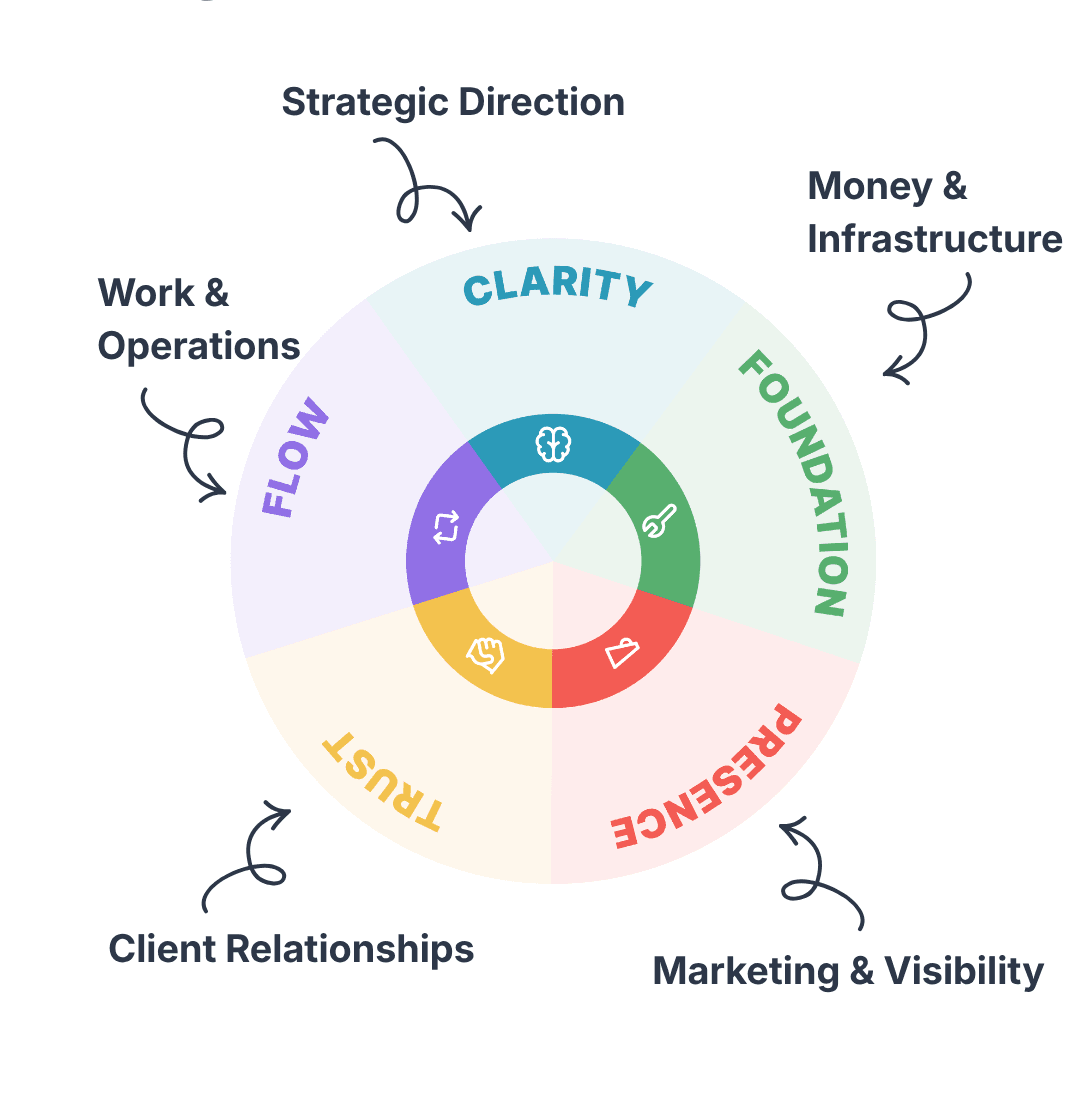
Five modules, one system
Everything your practice runs on. Already connected.
Every business has the same five core areas. SimpleMark gives each one a home and links them behind the scenes, so there is nothing to configure and nothing to enter twice.
How it works
Send one link. Watch the new client move through your whole business.
Kate runs a design studio. She sends a new client one onboarding link. Click each step to see what happens next, without her doing anything else.
01 · Send a branded onboarding link
The client fills it in and lands in your CRM.
Your logo, your questions, their timezone and availability. You never retype a new client again.
02 · Open the new project
A ten-step onboarding SOP is already waiting.
Discovery call, contract, kickoff, delivery. No checklist written from scratch.
03 · Create the invoice
Your services and rates pre-fill. One click to send.
Branded, auto-numbered, and counted in your net revenue the moment it is paid.
04 · Note a content idea
It links to the quarterly goal you already set.
A case study from this project goes straight onto your content calendar instead of a forgotten note.
05 · Check this month
Your capacity updates on its own.
You can see whether there is room for one more client before you say yes. No spreadsheet, no mental math.
What client tools leave out
HoneyBook, Bonsai, and Dubsado are built for the client transaction. None of them plan your quarter or your content.
Your goals sit next to your client work
Set two or three priorities for the quarter. Projects, content, and capacity all connect back to them, so you can see if a new client fits before you say yes.
Marketing that survives a busy month
Audience notes, campaigns, and a content calendar in the same place as your clients, so finding the next client doesn't stop the moment the current one gets busy.
Five subscriptions, or one.
Even with a client tool that bundles CRM and invoicing, a typical stack runs over $100 a month before you add anything to connect it. SimpleMark is one flat price with no per-seat charges and no feature tiers.
- Client tool (CRM, onboarding, invoicing)
- $29
- Project tracker
- $10
- Notes and SOPs
- $12
- Social media scheduler
- $18
- Accounting and expenses
- $35
Approximate entry-level monthly prices for comparable standalone tools.

Maria Kuznitsyna
Founder and solo developer
“I spent years configuring enterprise software for 5,000 people. Then I went independent and became a human integration layer between five open tabs. So I built the one workspace I wished existed.”
Bootstrapped. No investors. One price for everyone.
One plan. Everything included.
$29/month
Billed monthly. Cancel anytime.
- All five modules: Clarity, Flow, Trust, Presence, Foundation
- Unlimited clients, projects, SOPs, and invoices
- Capacity tracking, smart alerts, and Focus Mode
- Branded client onboarding links and PDF exports
No card to start. When the trial ends, your account pauses until you choose a plan. Cancel and your data is fully deleted within 30 days.
Before you switch
What happens when the 30-day trial ends?
SimpleMark pauses instead of charging you. You choose a plan through Paddle, our payments partner, and we never store your card details.
Can I bring my data from Notion, ClickUp, or spreadsheets?
Yes. Import a CSV or XLSX file during onboarding, so there is no manual re-entry.
Does SimpleMark use my data to train AI?
No. There are no AI features and your data never goes into any AI model. That is a decision about what the product is, not a temporary policy.
Does it work on mobile?
Yes. SimpleMark is fully responsive, both for you and for every client you send an onboarding link to.
What if I need something the five modules do not cover?
Keep using whatever else you need alongside it. And tell us what is missing; the roadmap is built from what independent professionals actually ask for.
Can I add a collaborator later?
Yes. Invite admins and members with edit access, or guests with read-only access, still on one price.
Not ready to switch tools yet?
Start with the free Client Onboarding Checklist. Nine steps from first contact to close-out that work with the tools you already have. Interactive, printable, and no email needed.
Stop setting up. Start building.
Import your clients from a spreadsheet and have the whole practice running in one place in under 30 minutes.
Start your 30-day free trialNo credit card · English, Hebrew, Russian · Your data never trains AI